
Frequently Asked Questions
How do I use the web-apps?
You can view all of our Video Tutorials and Demos here.
You can download (and print) Quick Guides here.
How do I upgrade my subscription?
You can upgrade your plan at any point by selecting a new plan here.
If you do upgrade your plan please contact us to let us know so that we can check that your new plan has been setup correctly.
How do I downgrade my subscription?
If you wish to downgrade your subscription, perhaps from a plan that gives you access to All Apps, to one that gives you a single app, then please contact us.
How do I cancel my subscription?
You can cancel your subscription as any point by visiting your account page here.
Please note that this will end your current plan at the end of the current payment cycle. You will continue to have access to your purchased web apps until the end of the current billing cycle. You will not be entitled to a refund if you choose to cancel early.
Do I need a mouse?
We recommed that you do use a mouse to get the best experience when using the web apps.
It is possible to use a trackpad, but it’s very fiddly!

How do I use the web apps with Zoom?
- Select the web app you wish to use from My Apps
- Please wait while the app loads.
- Next, share your screen in Zoom (It is much easier to do this BEFORE you hit Start!)
- Press Start to launch!
- The web app will automatically launch in full screen mode and you can begin using the web app with your client.
Full details of how to use the web apps with Zoom can be found in our Video Tutorials.
Can my client control the web app themselves when using with Zoom?
Yes! Although the success of this depends a little on your clients skill level and the quality of your internet connection.
To enable your client to take control and use their own mouse to control the web app you must first share your screen (as above).
Your client will then need to select the option on their screen to ‘Request Remote Control’. They can find this option in the drop down menu at the top of their screen (see image below).
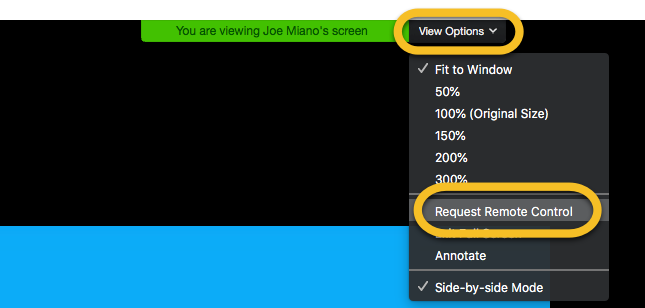
You will then be notified and will need to confirm this by clicking ‘Approve’.
The client can now control the web app!
How do I add labels?
Many of the web apps allow editable labels so that you can personalise the experience with your client. You can click on any editable label, whilst in editing mode, to type in a name of your choice. For more detailed instructions on how to add labels in specific web-apps please see our Quick Guides here.
How do I Insert a blank label?
Occasionally you might want to add a completely blank label and remove the placeholder text, for example in the Roles Played in Families web-app. To achieve this you click on the label like normal and simply add a single space using the Spacebar on your keyboard. This will remove the placeholder text and give you a blank label.
